
A Closer Look at REST APIs on the OutSystems platform

The majority of technologies nowadays are built using APIs, and as such, developers extend the capabilities of their applications by consuming exposed services to provide end-users with applications that are easy to use and have a variety of functionalities.
OutSystems provides built-in abilities and automation to easily integrate with external systems using SOAP Web Services, REST APIs and SAP connectors, resulting in reduced effort and shorter implementation times.
In this article, we’ll explore what REST API Web Services are and why they are important. We will also explore why they are widely used on the OutSystems Platform, what precautions to take while using them, and some suggestions.
What is a REST API?
REST API stands for REpresentational State Transfer Application Program Interface. These APIs are Web Services used in several platforms as an external service to enforce and extend applications' capabilities by adding features, data, and other functionalities. Using these services it’s easy to integrate OutSystems Applications with other systems or other OutSystems applications.
This Web Service is usually compared to SOAP (Simple Object Access Protocol) Web Service, to which OutSystems also provides built-in integration. To be able to integrate with a SOAP Web Service a WSDL (Web Services Description Language) file is required.The OutSystems IDE inspects the WSDL and generates everything needed to invoke the web service methods. Thus, this might require some further knowledge of the WSD language.
However, for a REST API integration, these are the main requirements:
Base URL or Swagger Specification file;
Security/Authentication requirements;
Methods definition (HTTP Method, URL Path, response format).
Regarding authentication requirements, each REST API will have its own model of security and authentication process described in the documentation. It may require creating an account, registering for an API key, or using tokens. Adopting Basic Authentication will use a simple authentication scheme built into the HTTP protocol in which the "Authorization" header of the requests shall contain the word "Basic", a space character, and a "username:password" string encoded in Base64.
When it comes to HTTP Methods (GET, POST, PUT, DELETE), OutSystems automatically sets the default endpoint based on the Method and on the name of the REST API. However, it is also possible to customize it. The URL Path determines the path of the service with the parameters needed to execute it. There are a few rules explained in the topics ahead. The response format needs to be defined in JSON, executed from an example request usually given by the documentation.
Below are some images from the REST API tools in OutSystems Service Studio.
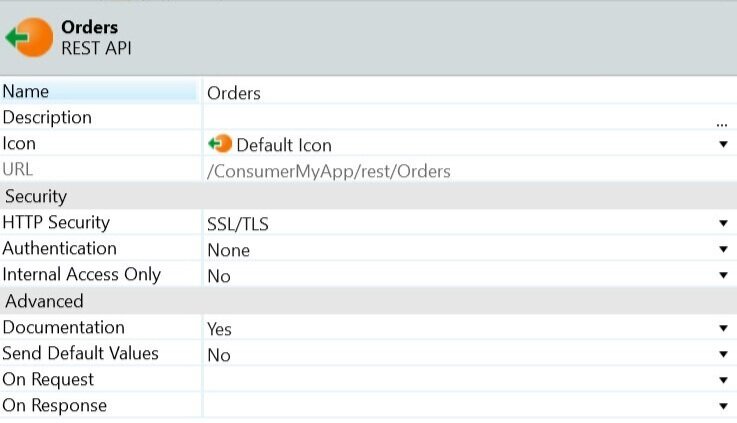
Extended properties of an Exposed REST API in OutSystems.
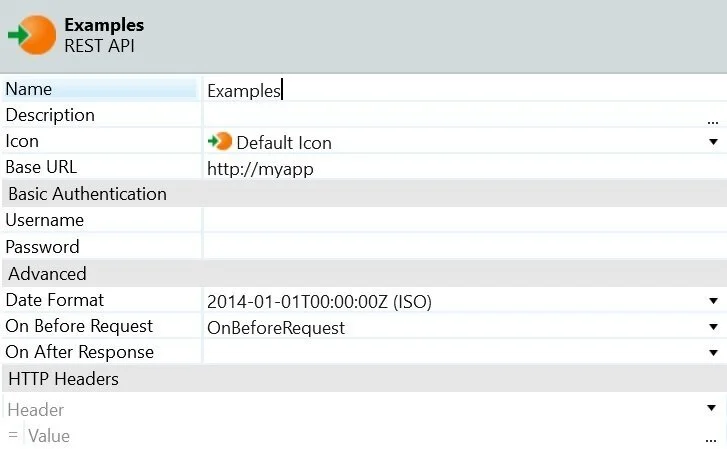
Extended properties of a Consumed REST API in OutSystems.
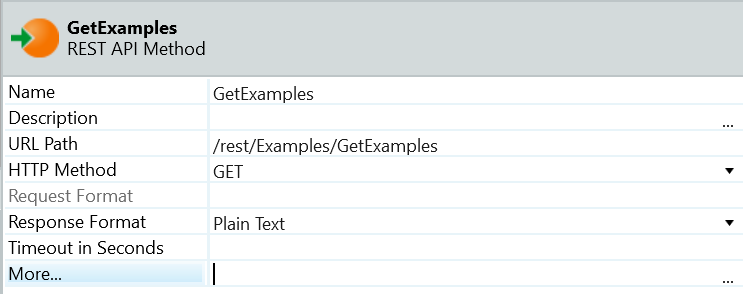
Example of a REST API Method and its extended properties with an URL Path and HTTP Method. In "More..." it opens the web service editor.
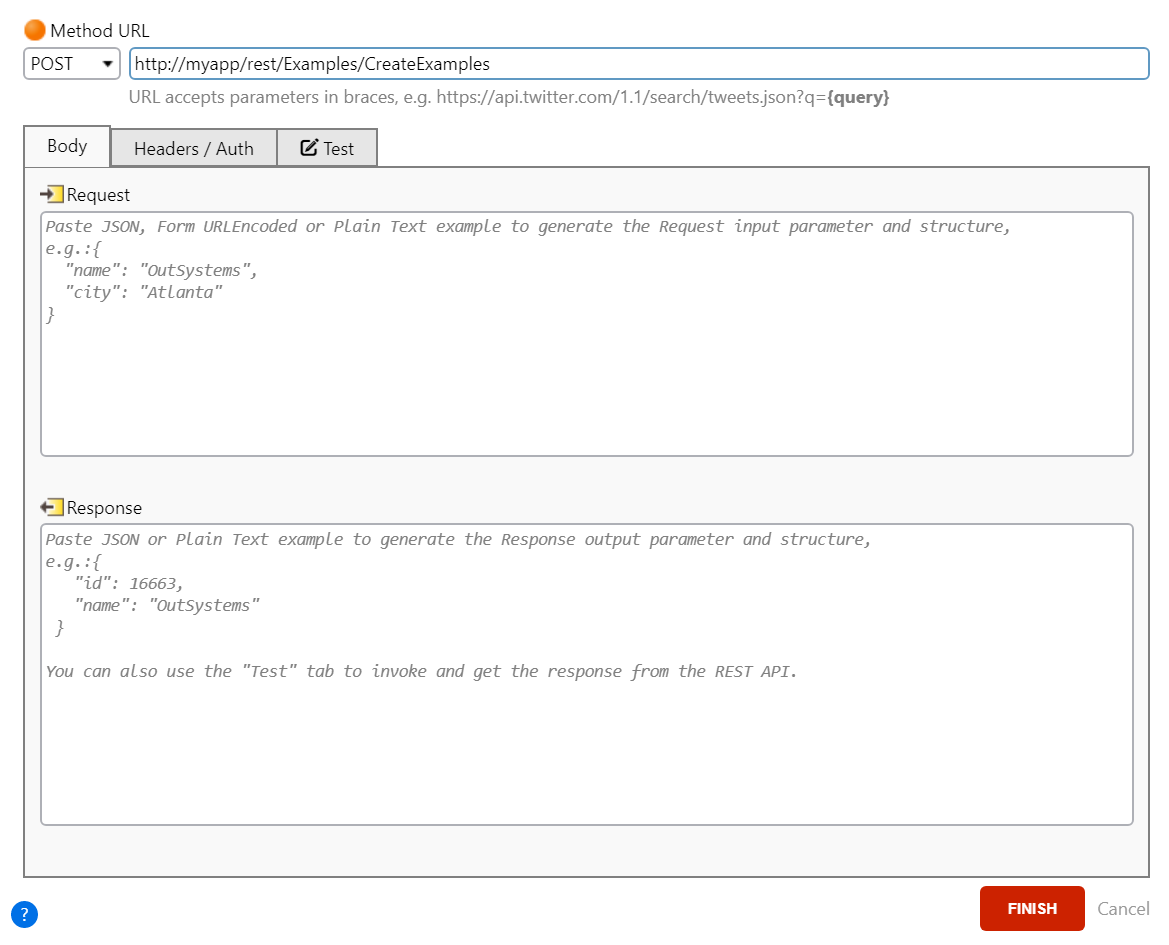
In the Web Service Editor we can set the HTTP Method, the base URL and the request format. On the second tab you can set the Headers and the Authentication requirements if any needed. In the third tab you can test the web service by filling in a request and headers if it exists. When testing, you can copy the response generated to the Body tab.
For further information about the REST API tools:
https://success.outsystems.com/Documentation/11/Extensibility_and_Integration/REST
https://success.outsystems.com/Documentation/11/Extensibility_and_Integration/REST/Consume_REST_APIs
Advantages of using REST APIs
REST APIs are great tools to upgrade applications. The OutSystems platform provides debugging, monitoring and troubleshooting built-in functionalities to facilitate the developer’s effort. The visual editor from the platform automatically generates artifacts such as methods and data structures to make the service ready to use. Furthermore, all integrations can be centrally managed at runtime and are instrumented, generating error logs and performance metrics. These are the main advantages of implementing a REST API:
Integrate faster;
Faster knowledge transfer;
Reusable integrations with governance;
Built-in logs and performance monitoring;
Centralized configuration management.
On top of all the built-in functionalities related to exposing a REST API, OutSystems automatically generates fully customizable documentation, making it available under the service end-point.
Apart from the services integrated from external services, a REST API exposed from OutSystems offers the possibility to have a loosely-coupled connection converting Server Actions into Service Actions which might progress to Service Modules and Service Applications through some specific rules. Thus, generating a weak dependency between modules, indicating that every change in the Service Action will take immediate effect on the consumer module. Gathering both advantages from Server Actions and REST APIs, the Service Actions have these specific properties:
Findability;
Impact analysis;
Strong typing;
Security;
Exception handling;
Access governance.
Service Modules, containing Service Actions, help enforce stricter segmentation of modules and support encapsulating core business services by not allowing Interface elements, module properties for interface, for example JavaScript and Global Event Handler, Email elements, Session Variables, Client-side logic, Local Storage Entities and Human Activities in Processes.
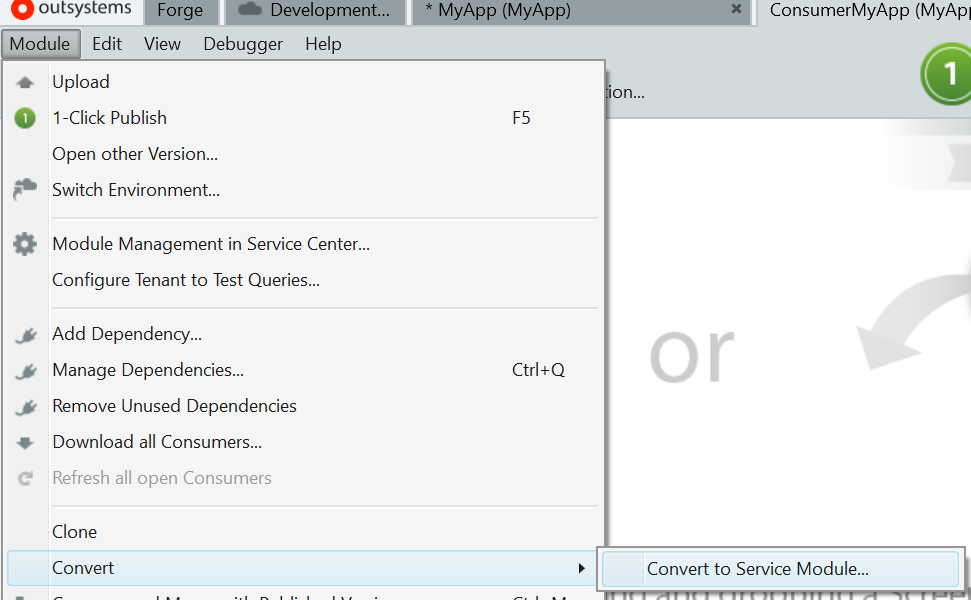
Converting your module to a Service Module follows specific rules described in the supporting links below.
Considerations when using REST APIs
The OutSystems platform allows developers to customize requests, responses, generate documentation, methods and data structures, and easily integrate a REST API. However, there are some considerations to have in mind when implementing REST API in OutSystems:
REST API Services Consumption
You can consume either one or several methods of a REST API, but there are some implications. To consume a single method, you may need to specify input parameters in the URL and/or a body for HTTP methods of type manipulation of data as POST or PUT. And it’s only possible to consume methods if that API is compliant with the Swagger specification. If you're importing an OpenAPI 3.0 specification file and the specification includes more than one server endpoint, you may choose the desired endpoint, but you can’t change the server endpoint after importing the REST API. On top of that, to consume a REST API, you will need a JSON format request to obtain a response and make the service ready to use. Fortunately, most documentations have a request sample to use.
Base URL Definitions
When filling in the information to test the REST API for the first time, as mentioned above, it requires a Method URL and if the service has them, you’ll need to insert the parameter values to execute the test. On top of that input parameters in URL query strings must follow a specific format, otherwise are not supported. These are the examples that are currently not supported:
Use an input parameter (with {}) to define a query string parameter name:
http://myapp.requestexample.com/Request/?{key}={value}
Use several input parameters to define a composed value for a query string parameter separated with a comma (,):
http://myapp.requestexample.com/Request/?key={value1},{value2}
Use JSON structures as query string parameter values:
http://myapp.requestexample.com/Request/?name={"last":{value1},"first":{value2}}
Define a generic query string that's only defined at runtime using an input parameter:
http://myapp.requestexample.com/Request/?{QueryString}
Additionally, it’s also important to remember that the last part of the URL with a dash character “/” can’t contain a period character “.” as this prevents the method of being called.
Authentication recommendations
When it comes to Authentication, it is essential to remember that REST APIs use a Basic Authentication encoded with the Base64 encoding scheme. However, this is easily decoded, and as such, OutSystems advises to use other security mechanisms such as HTTPS/SSL in your exposed web service.
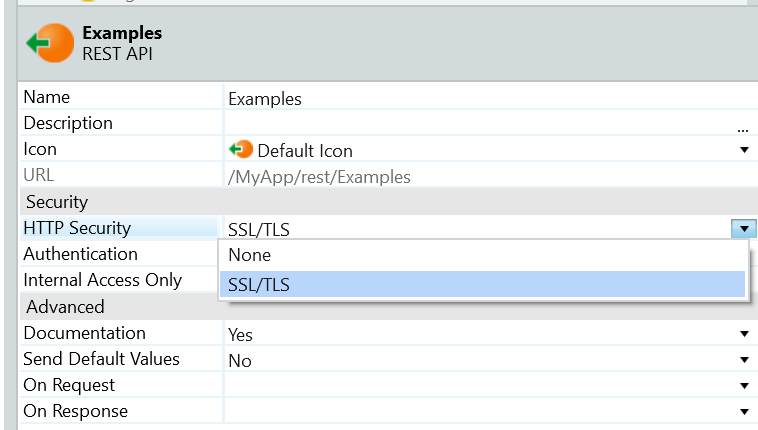
Setting the HTTP Security to SSL/TLS on Exposed REST API.
Data Manipulation Constraints
If the API requires HTTP headers, the developer may add and change its values, although existing ones cannot be removed. To do so, you will need to use the OutSystems REST Extensibility API, an external system. This extension from OutSystems is used to easily manipulate and access the request and the response used by methods consumed from other REST APIs.
To import “enum” (enumerate) elements when consuming REST services in OutSystems, they must be defined inside a "schema" field or referenced using "$ref”. Furthermore, these are the unsupported cases regarding “enums”:
"Enums" or array of "enums" with a type other than Integer or Text, since they can’t have a complex type (or array element type) as data type
Input Parameter specified by reference is created with the data type defined in the “type” field of the reference and the Static Entity won’t be created;
Output Parameter specified in the “header” section is also created with the data type defined in the “type” field;
Variable type using the “one of” keyword, that implies the use of more than one data type.
Finally, in requests where the data cannot be converted to either DateTime, Boolean, Date, Long Integer, or Decimal data types, it is converted automatically to Text.
Service Actions trade-offs
We’ve seen before that exposing Web Services to be consumed in other OutSystems applications has many advantages. However, it is relevant to note that exposed Service Actions don’t share the same process and transaction with the consumers. Thus, implementing fault-tolerant services requires additional logic on the consumer side. Moreover, a rollback within a Service Action does not rollback the logic executed in other Service Actions previously called by the consumer. Since the consumer and the producer run logic in different processes and requests are sent through remote calls, there might be some performance penalties, requiring logic to support the amount of data passed through the remote requests, because multiple processes require multiple transactions. Also, if there is a communication failure, the consumer logic must be prepared to handle the communication exceptions. In terms of development effort, these processes require additional logic to handle networking and transactions. Therefore, one must evaluate the pros and cons of choosing to use Service Actions: if the additional development effort pays off the increased business value of having independent release cycles and the capability to scale the services.
Once an application or module is converted to a Service application or module, it cannot be reconverted to a Web or Mobile application or module.
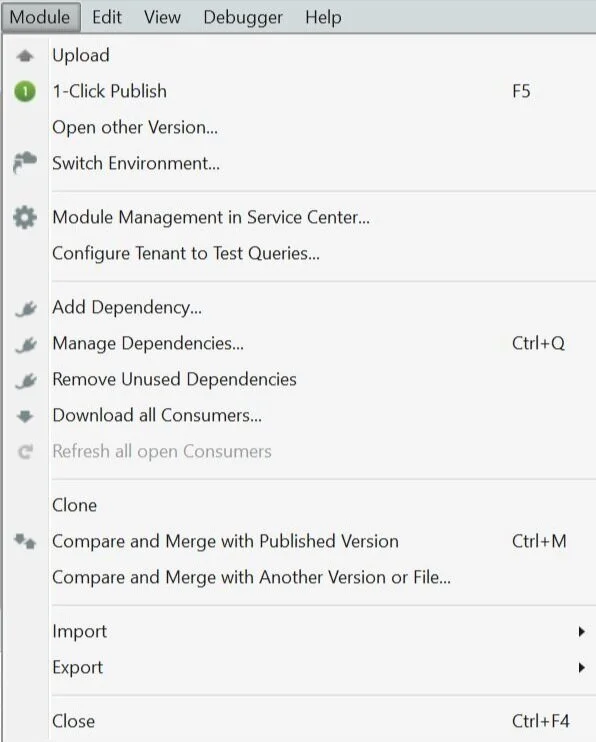
In Service Modules the "Convert" option in the Module Menu is not available anymore to convert the Service Module to Web or Mobile Modules.
Tips for successfully using REST APIs in the OutSystems Platform
When using a REST API in OutSystems, it is of the utmost importance to read the documentation and learn about all the functionalities available in the service. While consuming a REST API, it’s important to remember to provide the service end-point URL and an example of the service request and response in JSON format, which are the essential steps of implementing a service.
The Authentication and Security requirements are also vital since they might imply creating an account, registering an API key, or using tokens. Moreover, all input parameters with the Receive In property set to "URL" and that aren't included in the custom URL as part of the query string must be provided. Subsequently, the platform generates everything needed to invoke the REST service.
The OutSystems platform best-practices should also be followed here when it comes: to organizing the methods, the actions, and the structures; giving concise names in which you can extract the HTTP Method and the goal of the specific method; and writing descriptions. It is essential to build logic that is not too complex and heavy and, if possible, to not transfer large amounts of data to avoid poor performance and build Error Handling logic.
Read documentation;
Provide end-point URL, an example of request in JSON format, and the HTTP Method;
Answer the requirements of the service security model (fill in any necessary information for the request in OnBeforeRequest Callback Action);
Provide concise and clear names to actions and structures;
Provide descriptions;
If possible, pay close attention to the amount of data being transferred and the complexity of the logic to avoid poor performance and timeouts;
Build logic to handle errors (build any necessary logic to handle responses and/or HTTP status code and error messages in OnAfterResponse Callback Action).
Further reading: https://success.outsystems.com/Documentation/11/Extensibility_and_Integration/REST/Consume_REST_APIs
Closing
In the end, using REST APIs is a way to expand your OutSystems application with a world of possibilities and functionalities to explore, and the advantage of using the platform, making it quick and easy to implement, only simplifies the decision to use it. The Forge platform of OutSystems offers some trusted web services to use, but looking online also provides a portal to different possibilities to explore.
This guided course of how-to integrate with Web Services may be a helpful starting point to expand your knowledge on the matter.
Like this article? Share it: