
Building Efficient External Reporting in OutSystems ODC with Power BI and JSON

Designing effective external reporting in OutSystems Developer Cloud (ODC) requires a thoughtful approach to ensure data can be extracted, transformed, and visualized without affecting the performance of live applications. To support business users with timely, actionable insights, we implemented a reporting architecture that integrates seamlessly with Power BI, enabling automated data flows optimized for analysis. This approach ensures scalability, performance stability, and visibility into key metrics across product, marketing, operations, and other teams, all without relying on direct access to transactional systems.
Why Reporting Requires a New Approach in ODC
Understanding what’s happening inside an application is critical for teams across product, marketing, sales, and operations. Reports provide visibility into user behavior, application usage patterns, technical performance, and business outcomes, supporting informed, strategic decisions instead of relying on guesswork.
Transactional databases, such as MySQL, PostgreSQL, or SQL Server, are optimized for high-speed operations, including inserts and updates. They are not built to handle complex analytical queries or large-scale aggregations efficiently. These systems are typically structured using the 3rd Normal Form (3NF), which favors data consistency through heavy normalization. While ideal for transactional integrity, this results in more complex reporting queries, often requiring multiple joins and making it harder to perform historical or trend analysis.
Another common challenge is that transactional databases typically only store the current state of records. For example, you might see the current status of an order but not the previous transitions. However, for effective reporting, businesses often need access to historical data and aggregated insights over time, by region, or by user segments.
In OutSystems 11, the Database Replica feature addresses this by providing real-time access to a complete, read-only copy of the production database. Updates are reflected within seconds, allowing data teams to query and extract information for analysis without impacting performance or system stability. This feature is available in any OutSystems 11 Cloud environment.
(See documentation: Database Replica for Reporting)

Image 1 - Database Replica Diagram
At the time of writing, the same capability is not yet available in OutSystems Developer Cloud (ODC). To meet client requirements in ODC environments, we had to adopt a different solution, which is detailed in the following sections.
Overcoming Reporting Constraints in ODC
One of our main challenges in the ODC was the lack of direct access to the production database for reporting. ODC is a highly optimized environment for running applications, and its transactional databases are designed to support fast read and write operations, not large queries or volumes of data typically used in reporting and business analysis. Moreover, allowing direct access to the database could affect system performance and stability.
With this constraint in mind, attempting to run reports directly against the production database could lead to slow response times and degrade the user experience. As such, this approach was not viable in the long term.
Since direct access wasn’t feasible, we needed to find a workaround that would allow us to generate reports without compromising performance or data integrity. The initial priority was to ensure that business analysis and reporting could be done effectively without overloading the production platform or affecting the performance of live applications.
How We Enabled External Reporting in ODC with Power BI and JSON Automation
The solution we implemented aimed to improve the reporting process in OutSystems by working around the constraints of direct database access and enabling a seamless integration with Power BI. By dynamically generating incremental JSON files, storing them in OneDrive, and connecting Power BI to this structure, we were able to deliver timely, reliable, and accessible data for real-time business analysis without affecting application performance.
Why We Chose JSON for Data Export
The decision to use JSON as the export format was a strategic one. JSON is a widely adopted data structure recognized for its flexibility and hierarchical nature, making it ideal for representing complex and nested data. This was especially relevant in OutSystems, where entities often include composite relationships and dependencies.
JSON’s compatibility with Power BI was another key factor. Power BI supports native JSON import and can transform it into usable formats without requiring complex conversions or customizations. Thus, we could simplify the data export process while maintaining data integrity and eliminating the need for manual reconciliation.
Generating JSON Files for Reporting
The automation of JSON file creation in OutSystems was built around the application’s table structures. Using native platform capabilities, we created logic to dynamically generate data from OutSystems entities by traversing the necessary tables and exporting all fields into JSON format.
We began by developing a module that referenced all the necessary tables for data extraction. A static table was used to store the list of table names to include in the export process.
Once the data was identified, an OutSystems process was implemented to convert the selected records into JSON format and save them to a structured folder in the cloud. This folder serves as the data source for the reporting tool.
To ensure that only new or updated data was exported in each cycle, we established a few key rules:
No records would be deleted. Soft deletes were used instead.
All tables had to include two standardized fields: one for the creation date and one for the last modification date.
Tables without change-tracking fields (e.g., static data) were fully exported with each cycle.
Finally, the export process was scheduled to run automatically at regular intervals, keeping the JSON files continuously updated and ready for Power BI to consume. This approach simplified the data export process while maintaining system performance and scalability without overloading the database or impacting application functionality.
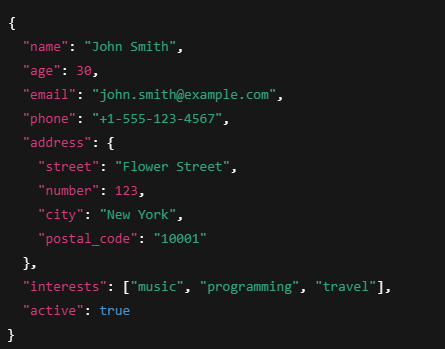
Image 2 – Json file example
Why We Used OneDrive as the Data Repository
Choosing OneDrive to store the JSON files was based on several factors that made it easy to integrate with Power BI and practical for managing data. In this case, the client already had Microsoft Services, with Power BI serving as the designated reporting platform.
As a native Microsoft solution, OneDrive integrates seamlessly and scalably with Power BI. The platform can read data directly from OneDrive, which makes it easy to set up dashboards and real-time reports without requiring complex configurations or additional data processing. Hence, OneDrive was a natural fit for hosting the JSON files generated from OutSystems while ensuring they remained accessible for analysis.
OneDrive also offers reliable cloud storage that can be accessed from anywhere, removing the need for local infrastructure. Features like easy sharing, version control, and collaboration support further contributed to its suitability.
Security was another key factor. OneDrive provides robust safeguards, including encryption, automated backups, and access controls. Thus ensuring that sensitive business data is protected and only available to authorized users.
Organizing Files for Efficient Power BI Integration
To ensure Power BI could easily access and update the reporting data, a clear and consistent folder structure was created in OneDrive. Each type of data or group of related information was placed in a dedicated folder, using descriptive and intuitive names. This organization made it simple for users to identify, locate, and work with the relevant files.
This structure also supported Power BI’s incremental update process, where only newly added or modified files are loaded and processed. As a result, the reporting workflows became more efficient, reducing processing time and conserving computational resources.
Technical Challenges
During the implementation process, several technical challenges arose that required a careful and pragmatic approach. The main obstacles we encountered were:
#1–Performance in Generating Data at Scale
There were concerns that generating large JSON files directly from OutSystems could impact platform performance. Since OutSystems is designed for high-speed, real-time transactions, extensive read operations posed a risk of slowing down the user experience and affecting overall application responsiveness.
#2–JSON Data Format
While JSON is highly flexible and well-suited for exporting structured data, challenges can arise when working with large data volumes or deeply nested structures. In such cases, files can become too large for Power BI to handle efficiently, leading to delays or errors during the import process.
#3–Automation and Scheduling:
Ensuring that data was refreshed automatically, without manual intervention, was another key requirement. JSON files needed to be generated and stored in OneDrive on a regular schedule, which required a robust automation process to maintain synchronization and ensure secure, continuous availability for reporting.
How We Addressed the Technical Challenges
Each of the technical challenges we encountered required a practical solution that would work effectively in the ODC environment without introducing complexity or compromising performance.
#1–Performance in Generating Data at Scale
To avoid overloading the platform, we decided to export only the data that had changed since the last run. Instead of pulling the entire dataset every time, we focused on deltas, just the new or updated records. Thus, substantially reducing the amount of data processed and keeping the impact on the live application to a minimum. We ensured that our queries were optimized to access only what was necessary, thereby maintaining performance where it mattered most.
#2–JSON Data Format
While JSON provided the flexibility we needed and worked well with Power BI, it became tricky when the data was too large or too deeply nested. To maintain efficiency, we took extra care with the structure, keeping it clean, hierarchical, and free from unnecessary repetition. We also broke the data into smaller, incremental files, allowing Power BI to handle updates smoothly. If the data ever grows beyond what Power BI can comfortably support, we’ve already considered alternatives like CSV or Parquet.
#3–Automation and Scheduling
We wanted the entire process to run without manual effort, so we used OutSystems’ built-in timers to schedule regular exports. JSON files were created and uploaded to OneDrive automatically. To ensure reliable operation, we implemented a simple alert system to notify us of any issues that may arise and developed a small back-office interface to monitor the process and identify errors.
These adjustments enabled us to work around the technical limitations we faced and establish a reporting pipeline that’s efficient, stable, and easy to maintain, all without placing pressure on the production environment.
Delivering Reporting Without Compromising Performance
The implementation of the reporting solution, which exports data as JSON files and integrates with Power BI, had a substantial and measurable impact on both reporting efficiency and overall system performance.
Operational efficiency increased significantly thanks to the streamlined and automated data export process. Instead of running resource-heavy queries directly on the production database, the system now generates and updates only delta data, meaning only new or changed records are processed in each export cycle. This incremental approach reduces the volume of data handled per export, making updates faster and lighter.
The load on the OutSystems platform remained minimal, as generating JSON files did not interfere with real-time application performance. By exporting only the updated data rather than the whole dataset, the solution avoided putting unnecessary strain on the system, allowing the application to continue running smoothly and ensuring a stable user experience.
On the Power BI side, the integration with OneDrive enabled seamless and automatic updates to the JSON files. Power BI’s auto-refresh capability ensured that dashboards were always up to date with the latest information without requiring any manual intervention. Even with large volumes of data, Power BI handled the updates efficiently, thanks to the optimized JSON structure designed for fast and reliable reading.
Key Takeaways from the Reporting Integration
Throughout the implementation of the reporting solution using JSON files with OutSystems and Power BI, several lessons were learned that helped streamline the process and achieve the objectives efficiently.
The first was that planning data extraction incrementally, rather than relying on full exports, greatly improved performance and reduced system strain.
Another important takeaway was the value of choosing the correct data format. JSON proved to be highly compatible with Power BI, thanks to its ability to represent complex, hierarchical data without sacrificing performance.
Automation also played a crucial role. By automating data generation and updates, we eliminated the need for manual intervention, ensuring that reports remained consistently up to date.
Ultimately, integrating with OneDrive proved to be a wise decision, offering a straightforward method for storing and synchronizing data with Power BI.

Image 3 – Reporting solution using JSON files with OutSystems and Power BI
Recommendations for Similar Implementations
Based on the experience gained, the following suggestions may help others facing similar challenges:
Start with an incremental export strategy: When dealing with large volumes of data, avoid full exports. Export only the changes (deltas) since the last update. This minimizes processing time and reduces system impact.
Choose a flexible and compatible format: JSON worked well in our case because of its structure and native compatibility with Power BI. Select a format that your reporting tools can handle easily.
Automate whenever possible: Automation saves time and reduces the likelihood of errors. Use the scheduling and automation features available in platforms like OutSystems to streamline updates and exports.
Organize your data effectively: A well-structured folder system with clear, descriptive file names makes maintenance and access much easier and simplifies ongoing reporting workflows.
Opportunities for Future Enhancements
Although the current solution performs well, several areas could be explored or improved in future iterations:
Exploring alternative data formats: As the volume of data continues to grow, switching to more efficient formats, such as CSV, Parquet, or Avro, may improve performance and reduce load times in Power BI.
Introducing monitoring tools: Adding monitoring and alerting to the export process would enhance reliability by helping catch and resolve issues early before they impact the end user.
Enhancing Power BI integration: While Power BI has worked well with the current setup, future improvements could involve using direct queries or more dynamic data-loading approaches to reduce reliance on static JSON files and improve overall responsiveness.
Like this article? Share it:


